14 days of Pro when you sign up, no card. Then Free, forever.
Public launch
OverviewIssuesBoardCycles
Backlog3
DRAPPS-142Offline sync for the storeBacklog🤖High
DRAPPS-140Team metrics dashboardBacklogMedium
DRAPPS-139Due-date remindersBacklogSRMedium
Done6
DRAPPS-131Export reports to PDFDoneDKMedium
DRAPPS-128Calendar integrationDoneLPHigh
DRAPPS-122Onboarding redesignDone🤖Medium
Open MCP
Import from JIRA, Trello, monday and Asana
Full data export (GDPR)
Agents never take a seat
14 days of Pro, no card
Hilbana in under a minute.
Your tasks, your agents, your context. See it working in 55 seconds.
What stays half-done today gets to “done” here.
Without HilbanaWith Hilbana
You can't see what your agents are doing
You're in charge
Mark which tasks they can take and review what they hand back. A task locks when an agent claims it, so two agents don't work the same one.
Every session starts from scratch
Memory that travels with them
They save decisions and conventions when they finish and recall them when the next session starts. On paid plans, the other projects' too.
The tool lags behind you
Fast, no waiting
The interface responds instantly and the server catches up afterwards, with no spinners breaking your flow.
Hand it a task. It comes back done, not “almost”.
An agent claims the task, gets the whole brief, moves it across the board and hands it back for review with its trail, the way a person on the team would.
Connecting an agent is one command
Any agent that speaks MCP (Claude, your own tools) reads and writes tasks like any other member.
$ claude mcp add --transport http hilbana https://app.hilbana.com/mcp
01 · The agent claims the task
claim_issue DRAPPS-241
02 · It gets the whole brief
Offline sync for the store
context
3 files, 2 prior decisions
done
Tests green, no API changes
scope
Only the sync module
03 · The agent sets it to “In progress”
DRAPPS-241Offline sync for the storeIn progress🤖High
04 · It hands it back for review
🤖Agent · 2 min ago
Done. Tests green, public API untouched. Batch size still needs a decision: I left a comment.
What one agent learns in a project, they all know.
As they work, your agents save decisions and conventions into the project's memory. On paid plans, any project in the workspace consults that memory, and anything from another project arrives labelled: you know what's the house rule and what's a reference.
Memory / Public launchmem_context · crossProject
Scopes
Public launch42
Mobile app118
Public website27
convention
Internal links always end with a slash: without it the CDN redirects.
2 days ago · links
bug
CSV import failed on a BOM at the start of the file. Stripped before parsing.
5 days ago · import
decisionfrom Mobile app
Agents leave the task in review; closing it belongs to the reviewer.
3 weeks ago · workflow
Agents save it, typed and tagged
Seven types: decision, bug, convention, discovery, preference, fact and note. They load the project's context on startup and leave a summary on close. You search full text and the most recent comes first.
Shared across the workspace
In a new project, your agents start with what they already learned in the others: a bug's root cause or the commit convention. Each workspace has its own: what an agent learns working for one team stays with that team.
You review it
On the Memory page you see each scope with its memories, type, topic and date, and search them. Delete what's noise (history is kept) and leave what should last.
What it solves
You stop starting from scratch: no re-explaining the same thing each session or each project, and a bug you already diagnosed doesn't come back in the next one.
On Free, memory is per project; on Pro and Team it's shared across the workspace's projects. Going back to Free keeps everything: the agents stop searching outside the project, and that's all.
New · Invoicing integrations
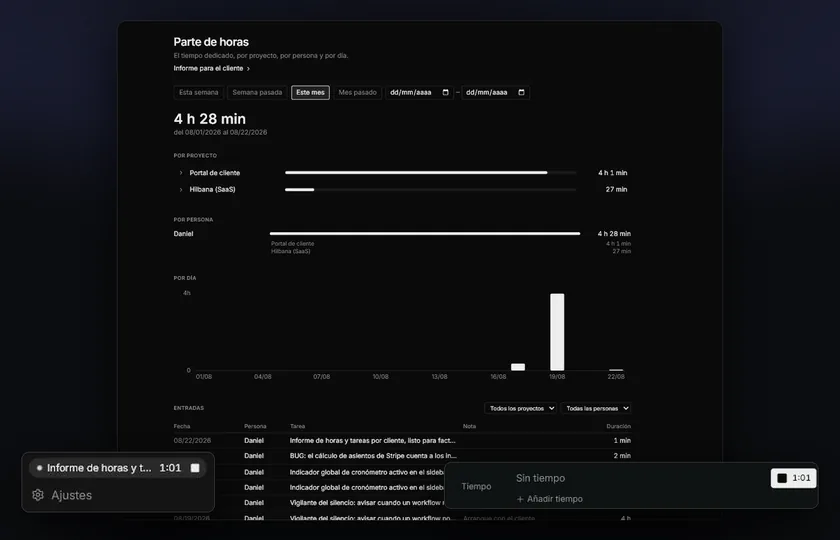
The hours you log, invoiced in your invoicing software.
Your team's hours on a project become a draft invoice in your ERP, with one line per task. No CSV to export and nothing to type twice.
OdooAvailable
HoldedComing soon
Zoho InvoiceComing soon
One line per task
Each line carries the task's identifier and title, and its hours with two decimals, unrounded. It's what your client recognises on the invoice.
Always a draft
Hilbana never confirms or sends the invoice. Your invoicing software sets the price and taxes; you review it and confirm it there.
Nothing is invoiced twice
Every invoiced hour gets a mark, and one logged late goes into the next invoice on its own. Internal hours stay out.
Each integration is a module bought separately, on top of a paid plan and with time tracking. You can add it when you choose the plan, in the same payment.
“Development” service at €50/h. You confirm and send it from Odoo.
Testimonials
«What it took off our plate was having to explain the same thing to every agent, every time. We design the tasks in Hilbana and then just work through a backlog that's already structured and prioritised. The context lives in the task, not in my head.»
Felipe PiquerCEO, Informage Studios
Plans
A plan that grows with you. Agents are free.
Start free and move up as the team grows: agents never count as seats.
2 months free
Free
For you and your first agent.
Freeforever
Unlimited issues
3 projects · 3 members
1 connected agent, with project memory
Bring your JIRA or Asana project, or your Trello or monday board, over (200 issues per import)
Features not everyone needs. They are bought separately, on top of a paid plan, and dropped when they stop being useful.
Time tracking
€8.99/mo€89.90/yrexcl. VAT
What each task actually cost.
A timer on the task itself, with only one running at a time
Weekly timesheet per person, editable by hand
Hours and tasks report per project, with CSV export for invoicing
Your agents clock in too: they log their time over MCP
Requires Pro or Team. Bought when you choose the plan, in the same payment, or later from Settings → Billing, inside the app.
Invoicing with Odoo
€39/mo€390/yrexcl. VAT
Logged hours, turned into a draft invoice in your Odoo.
One line per task, with its identifier, title and hours with two decimals
Always a draft: Odoo sets the price and taxes, and you confirm it there
Only billable hours not yet invoiced: nothing is charged twice
Odoo 16 or later: Odoo Online, Odoo.sh or installed on your servers
Requires Pro or Team and Time tracking, which is added for you if you don't have it. Bought when you choose the plan, in the same payment, or later from Settings → Billing, inside the app.
Still deciding?
Tell us what your team needs and we'll say if we're a fit.
Yes. Export all your data whenever you want (we're GDPR-compliant) and work with open MCP.
How do I control what agents do?
You mark which issues they can take; they claim them with locking (two agents never clash) and you review what they build.
Do my agents remember previous work?
Yes. They store decisions, conventions and mistakes and recall them across sessions on their own. Recalling them across projects too comes with the paid plans; if you go back to Free nothing is deleted, it just stops searching outside the project.
Do agents count as members?
No. Members are people. On paid plans agents are unlimited and never take a seat; Free includes one.
Can I share documentation with my client?
Yes. Each project's documentation is organised in folders, and you can publish a single document or a whole folder: anyone with the link reads it without an account, and a published folder is a navigable mini-site with its own index and search. One click cuts it off, and Settings holds an inventory of everything the workspace has published. It is read-only, it does not show up on Google and it takes no anonymous comments; if you want someone outside to comment, invite them to the project.
Do I need to know AI to use it?
No. It works great without agents; with them, it flies.
Which agents does it support?
Any that speak MCP (Claude, your own tools…).
Can I bring my JIRA, Trello, monday or Asana work over?
Yes, all four, from Settings → Import. Before anything is written you get a preview of exactly what will happen, and every run can be undone whole. From JIRA (with your Atlassian token) issues come over with their description, status, priority, assignee, labels, dates, estimate, the hierarchy (Epics become the parent issue) and comments; attachments, change history, sprints, versions and issue links do not. From Trello, each list maps onto one of your states and cards arrive with their description, their checklists as a tickable task list, labels, comments, due date and the board order; attachments and archived items do not come over. Connecting Trello is pasting your Power-Up's API key and authorising: no tokens to copy. From monday, items arrive with their description, people, dates, labels, comments and their subitems as sub-issues; since monday has no status field as such, you choose whether the board's groups or a status column rules. Connecting it is pasting your personal token, with no app to register. From Asana, each section maps onto one of your states and completed tasks go to their own state with their real completion date; tasks arrive with their description, assignee, dates, labels, comments and their subtasks as sub-issues; attachments and custom fields do not come over. Connecting it is also pasting a personal token. Free imports 200 issues per import; paid plans have no cap.
Can I try it for free?
Yes, two ways: signing up gives you 14 days of Pro with no card, and the Free plan never expires (3 projects, 3 members, 1 agent and 500 MB of attachments).
What happens when the Pro trial ends?
You move to Free automatically. We never asked for a card, so there's no surprise charge. Your data stays put: only Pro features pause.
Is paying yearly cheaper?
Yes: yearly is two months free compared to monthly. You can switch cycles whenever you want from your account.
We're a large team — which plan fits?
Team includes 10 people and adds €6/month for each extra one. If you're well beyond that, or need SSO, an SLA or invoicing, let's talk and we'll tailor it.
Can I switch plans or cancel?
Whenever you want, from your account. If you cancel you keep access until the period you've already paid for ends.
Do I pay for each workspace?
No. The plan belongs to your account and covers every workspace you create, at no extra cost. Members count as distinct people across all of them (someone in two counts once), and attachment space is the account's total.
Stop managing against your tool. Start managing with it.
14 days of Pro when you sign up, no card. Then Free, forever.
Cookies
We use necessary technical cookies and, only if you accept, Google cookies to measure our audience and how our campaigns perform. You can change your mind at any time.